
Seedream 4.5 Image Editor
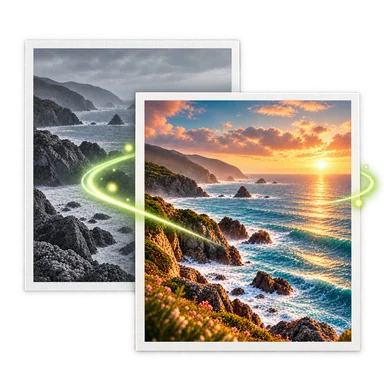
The Seedream 4.5 image editor above starts with Seedream selected for compatible photo edits. Upload a source image, describe the requested change, and choose an available 2K or 4K output setting. The live credit quote appears before generation; inspect the finished image and actual download format. The example below is illustrative, not a verified Seedream output.
Seedream 4.5 Editor: Before and After


How to Edit Photos with Seedream 4.5
- 01
Upload a source image above. Guest edits accept one PNG, JPEG, or WebP image up to 20 MB. Signed-in editors can use up to three ordered images when the selected task supports them.
- 02
Keep Seedream 4.5 selected, choose 2K or 4K and one of the ratios shown in the editor, then explain the change and the details to preserve. Seedream 4.5 here creates ordinary opaque images, not transparent cutouts.
- 03
Check the credit quote, generate, and compare the result with the original. Review product labels, faces, framing and edges before downloading the actual JPEG or PNG result.
Seedream 4.5 Image Editing Workflows
Product campaign scenes
Place an existing product in a new setting with a precise prompt. Describe what may change around it and verify the bottle, packaging and label against the source.
Several ordered references
On a compatible task, provide up to three images and explain what each source contributes. Check that objects or people from different images were not unintentionally mixed.
Portrait environment edits
Request a different background or lighting around a portrait. Confirm facial identity, clothing and pose before using the generated image.
2K and 4K variations
Create separate versions at the available 2K and 4K settings when the final placement needs more detail. Compare the actual files and quote rather than assuming a particular pixel size or perfect consistency.
Seedream 4.5 Settings and Limits
Choose an available size
This integration offers 2K and 4K, with the supported ratios shown in the current workspace. It does not offer 1K for Seedream 4.5.
Use ordinary image output
Seedream 4.5 is not offered for the transparent Background Remover workflow. The saved result can be JPEG or PNG; the download uses the actual file type.
Check exact details
Generated edits may change small text, packaging, composition or a person's appearance. Name key details in the prompt and inspect them in the result.
Review the quote and provider
The current credit quote is shown before generation. AI Photo Editor accesses ByteDance's Seedream 4.5 through Kie; this site is an independent service, not an official ByteDance product.
Seedream 4.5 Editor FAQ
Is Seedream 4.5 selected on this page?
Yes. This page opens the shared image-to-image workspace with Seedream 4.5 selected. You can adjust the prompt and choose among its currently available settings.
Can I choose 1K or a transparent background?
No. This site's Seedream 4.5 integration offers 2K and 4K ordinary image output. For a transparent cutout, open Background Remover and choose a compatible model.
How many images can I upload?
Guest edits accept one PNG, JPEG, or WebP image up to 20 MB. Signed-in editors can use up to three ordered images when the selected task supports them.
Will the result be JPEG or PNG?
The provider may return JPEG or PNG. The site's preview and download use the actual saved file type; check the result before using it in another tool.
How many Credits does Seedream 4.5 use?
The workspace shows the current price for the selected 2K or 4K setting and output count before generation. AI Photo Editor accesses Seedream 4.5 through Kie and is independent of ByteDance.